COMPONENT

How to Add a Lightbox Gallery to an Image from a Framer CMS Gallery

Ever wondered how you extract an image from a Framer CMS Gallery to use for Carousels or Lightboxes? Grab a coffee, you're about to learn how to do it.

Added on

shuffle cloned instances component for Framer
Contents
No headings found

Introduction

This article is going to teach you how to extract an image from a Framer CMS gallery and connect it to a Lightbox. The process involves extracting, basically cloning one of the images which opens up endless possibilities to also connect it to various Carousel, Sliders or pretty much anything that will fit your use case.

Getting Started

First off, you're going to need two pieces of custom code to make this work. The first one is the actual component that lets you extract the image and the second is a code override that adds the Lightbox itself, both of them are free and provided by us.

The component that clones the images can be grabbed from here or at the bottom of the page. The Lightbox code override can be grabbed from another article that details it out, specifically, here.

Preparing the CMS Gallery

For CMS Pages

If you're on a CMS page, you can just drag and drop a gallery on to your Canvas from Insert > Fields > Gallery. Once that's done, right click the gallery and Create a Component, that will expunge the Gallery variable and give you the options to connect it to a data source.


Framer CMS gallery nested within a component

Open up your gallery component and nested at the lowest level find the Image layer, to this layer you will attach the code override of the Lightbox. Make sure you set the width and height of your Image to what you would like to be represented in the Lightbox.

Connect the now expunged Gallery variable to the data source (the CMS gallery). What we did here basically is that we took a gallery, we nested it within a component to prepare it for various use cases, expunged the gallery variable, and reconnected it to the data source.


expunging Framer CMS gallery variable within a component

On the actual page, add the Image Gallery Slide component that you got from the first link, and connect it to the gallery component that's outside of the page (on the canvas).


extracting / cloning a single Framer CMS image from a gallery

Use the Image Index control property to pick which image you want to show from your CMS gallery.


using an index to show the extracted / cloned image from Framer CMS gallery

For non CMS Pages

If you're on a non CMS page, the process is similar but involves an extra step. You need to first drag and drop a collection onto your Canvas, so Insert > Collections > Collection. Nested within the collection you're going to add your gallery. If you already nested the gallery within a component, just drag and drop that component within the collection.


nested Framer CMS gallery component within an imported collection to show on non CMS pages

Connect your collection to the Image Gallery Slide as you did previously.

The last step you have to do in case you have multiple CMS items, is to filter the item's gallery you want to show, which is by Title in this case; otherwise you will see all your CMS item galleries within the collection.

To filter the gallery, select the collection on the canvas, go to Filters > Match > Any then for Filters > Field > Collection > Equals > Your Article.
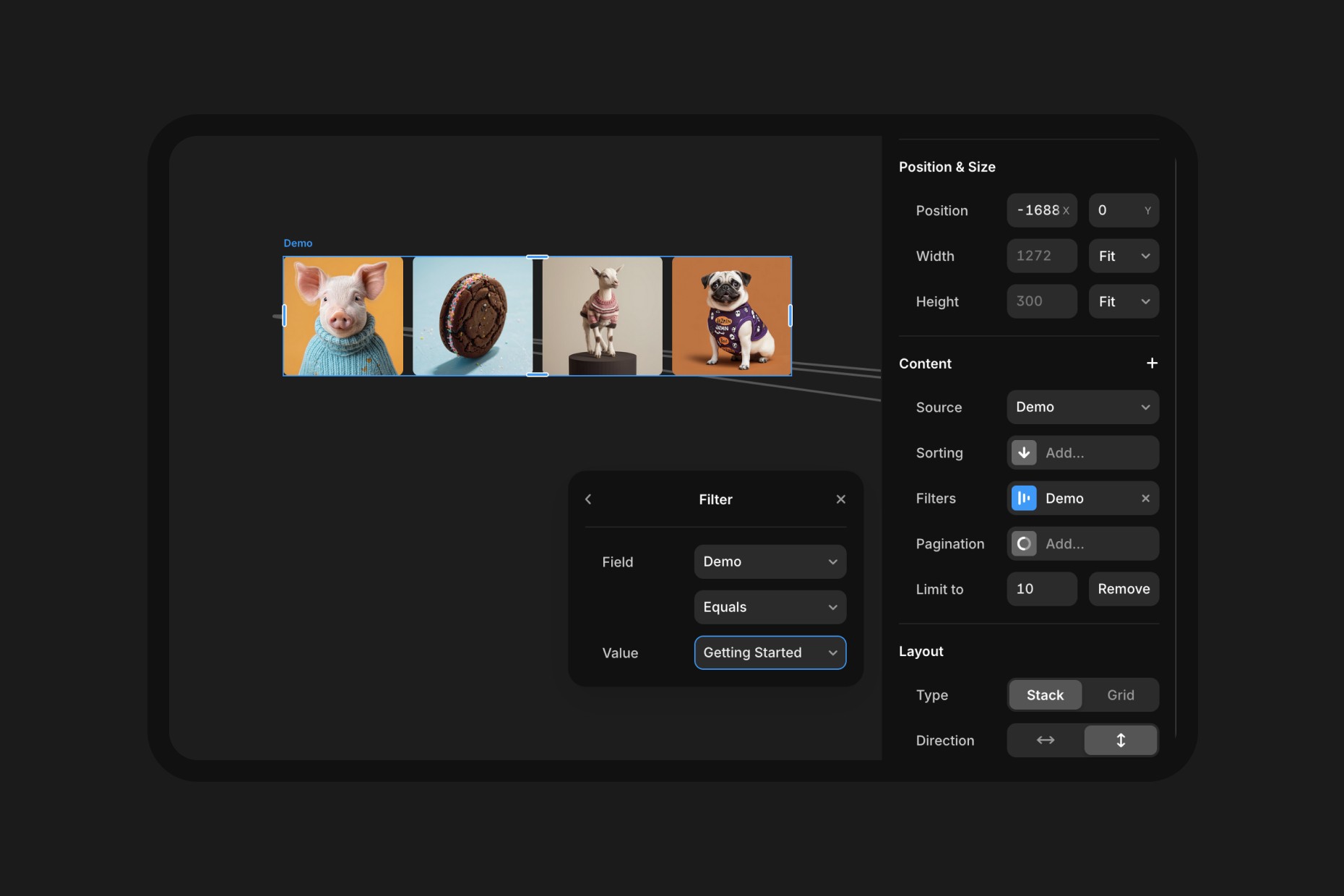

Filtering a Framer CMS collection to showcase only one CMS gallery on non CMS pages

If anything is unclear or you feel like you need an example to figure it out, provided with the Image Gallery Slide component there is the remix link which already has a demo setup so you can disseminate and examine the implementation.

People also ask

Can I use these resources for Framer templates or commercial projects?

Yes you can, our resources are available for all creators.

Can I get support or help from you on this?

We offer very limited support to our free resources, but shoot an email, we might give some pointers to help you out.

Can I share these resources with my peers or audience?

Yes, we'd love it if you shared these resources with other so more people can access them, just make sure to credit us.
Get a free

domain with Framer

Meet your new social media planner.

New Framer Template just Dropped

swiper fintech framer template

Recommended articles

Loved this? Keep exploring with our handpicked Framer resources, dive deeper, sharpen your skills and level up your Framer game.

What a Framer Website Actually Costs in 2026: Template vs Freelancer vs Agency

What a Framer Website Actually Costs in 2026: Template vs Freelancer vs Agency

Light & Dark Theme Toggle for Framer

Light & Dark Theme Toggle for Framer

Top 15 Must-Have Framer Plugins for 2026

15 Must-Have Framer Plugins for 2025

Framer vs Figma Sites in 2026: Which Should You Actually Build On?

Framer vs Figma Sites in 2026: Which Should You Actually Build On?

The 15 Best Free Framer Fonts in 2026

Top 15 Free Framer Fonts to Improve Your Designs in 2025

Shuffle Cloned Instances Component for Framer

shuffle cloned instances component for Framer

Table of Contents Component for Framer

table of contents component for Framer

Framer vs Webflow: Which Platform is Best for Web Design in 2026?

Framer vs. Webflow: Which Platform is Best for Your Web Design Needs?

Pixelated Preloader for Framer

pixelated preloader component for framer by pixcodrops.com

Autoplaying Carousel Component for Framer

preview of an autoplaying vertical carousel with background change for framer

Scroll Spin Gallery Component for Framer

scroll spin gallery component for framer by pixcodrops.com

Timed Popup Ad Component for Framer

Timed Popup Ad Component for Framer

Top 10 Free Framer Fonts Every Designer Must Use in 2025

Top 10 Free Framer Fonts Every Designer Must Use in 2025

Framer Agents Explained: In-Editor AI vs External Agents

Framer Agents Explained: In-Editor AI vs External Agents

Before and After Slider Component for Framer

Before and After Slider Component for Framer

What a Framer Website Actually Costs in 2026: Template vs Freelancer vs Agency

What a Framer Website Actually Costs in 2026: Template vs Freelancer vs Agency

Light & Dark Theme Toggle for Framer

Light & Dark Theme Toggle for Framer

Top 15 Must-Have Framer Plugins for 2026

15 Must-Have Framer Plugins for 2025

Framer vs Figma Sites in 2026: Which Should You Actually Build On?

Framer vs Figma Sites in 2026: Which Should You Actually Build On?

The 15 Best Free Framer Fonts in 2026

Top 15 Free Framer Fonts to Improve Your Designs in 2025

Shuffle Cloned Instances Component for Framer

shuffle cloned instances component for Framer

Table of Contents Component for Framer

table of contents component for Framer

Framer vs Webflow: Which Platform is Best for Web Design in 2026?

Framer vs. Webflow: Which Platform is Best for Your Web Design Needs?

Pixelated Preloader for Framer

pixelated preloader component for framer by pixcodrops.com

Autoplaying Carousel Component for Framer

preview of an autoplaying vertical carousel with background change for framer

Scroll Spin Gallery Component for Framer

scroll spin gallery component for framer by pixcodrops.com

Timed Popup Ad Component for Framer

Timed Popup Ad Component for Framer

Top 10 Free Framer Fonts Every Designer Must Use in 2025

Top 10 Free Framer Fonts Every Designer Must Use in 2025

Framer Agents Explained: In-Editor AI vs External Agents

Framer Agents Explained: In-Editor AI vs External Agents

Before and After Slider Component for Framer

Before and After Slider Component for Framer

What a Framer Website Actually Costs in 2026: Template vs Freelancer vs Agency

What a Framer Website Actually Costs in 2026: Template vs Freelancer vs Agency

Light & Dark Theme Toggle for Framer

Light & Dark Theme Toggle for Framer

Top 15 Must-Have Framer Plugins for 2026

15 Must-Have Framer Plugins for 2025

Framer vs Figma Sites in 2026: Which Should You Actually Build On?

Framer vs Figma Sites in 2026: Which Should You Actually Build On?

The 15 Best Free Framer Fonts in 2026

Top 15 Free Framer Fonts to Improve Your Designs in 2025

Shuffle Cloned Instances Component for Framer

shuffle cloned instances component for Framer

Table of Contents Component for Framer

table of contents component for Framer

Framer vs Webflow: Which Platform is Best for Web Design in 2026?

Framer vs. Webflow: Which Platform is Best for Your Web Design Needs?

Pixelated Preloader for Framer

pixelated preloader component for framer by pixcodrops.com

Autoplaying Carousel Component for Framer

preview of an autoplaying vertical carousel with background change for framer

Scroll Spin Gallery Component for Framer

scroll spin gallery component for framer by pixcodrops.com

Timed Popup Ad Component for Framer

Timed Popup Ad Component for Framer

Top 10 Free Framer Fonts Every Designer Must Use in 2025

Top 10 Free Framer Fonts Every Designer Must Use in 2025

Framer Agents Explained: In-Editor AI vs External Agents

Framer Agents Explained: In-Editor AI vs External Agents

Before and After Slider Component for Framer

Before and After Slider Component for Framer

FRAMER DISCOUNT

Host your website on Framer

Enjoy 3 months free on your Pro Annual Subscription when you sign up on Framer. Simply enter the code partner25proyearly at checkout.

FRAMER DISCOUNT

Host your website on Framer

Enjoy 3 months free on your Pro Annual Subscription when you sign up on Framer. Simply enter the code partner25proyearly at checkout.

FRAMER DISCOUNT

Host your website on Framer

Enjoy 3 months free on your Pro Annual Subscription when you sign up on Framer. Simply enter the code partner25proyearly at checkout.

framer resources by pixco

FREEBIES

Framer snacks
on the house

Snag slick components and magic-level code overrides for your next project. Totally free because you're awesome like that.

framer resources by pixco

FRAMER RESOURCES

Framer snacks
on the house

Snag slick components and magic-level code overrides for your next project. Totally free because you're awesome like that.

framer resources by pixco

FRAMER RESOURCES

Framer snacks on the house

Snag slick components and magic-level code overrides for your next project. Totally free because you're awesome like that.